
When all folder categories in Eagle suddenly disappear, it's usually due to damage to important library files caused by unexpected software crashes. Don't worry, Eagle automatically backs up data, and we can help you recover the lost folder categories through backup files.
Recovery Steps
-
Open your Eagle library root directory
-
Find the folder named
backup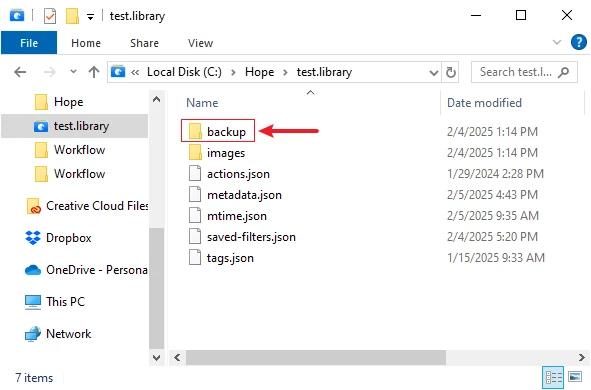
-
Compress the entire
backupfolder into ZIP format -
Send the compressed file to our technical support team through the official contact ticket
-
Note in the ticket that the issue is "All folder categories disappeared"
Important Notes
- Please do not attempt to modify any content in the backup folder yourself
- The technical team will process your recovery request as soon as possible after receiving your backup file
- Before the issue is resolved, it's recommended to temporarily avoid performing extensive operations on the library to prevent affecting the recovery results