
After upgrading to macOS Sequoia (15.0), you may experience issues with PSD files and other file types not displaying thumbnails correctly in Eagle. This article explains the cause and provides solutions to resolve this issue.
What's Causing the Problem
Our engineering team has identified that this issue stems from significant changes to the file thumbnail-related APIs in macOS 15. Apple has removed support for the old Quick Look Generator plugins and introduced new APIs and extensions to replace them.
How to Fix the Issue
We've resolved these compatibility issues in Eagle 4.0 build 4. To fix the problem:
- Click here to download and install the latest version of Eagle.
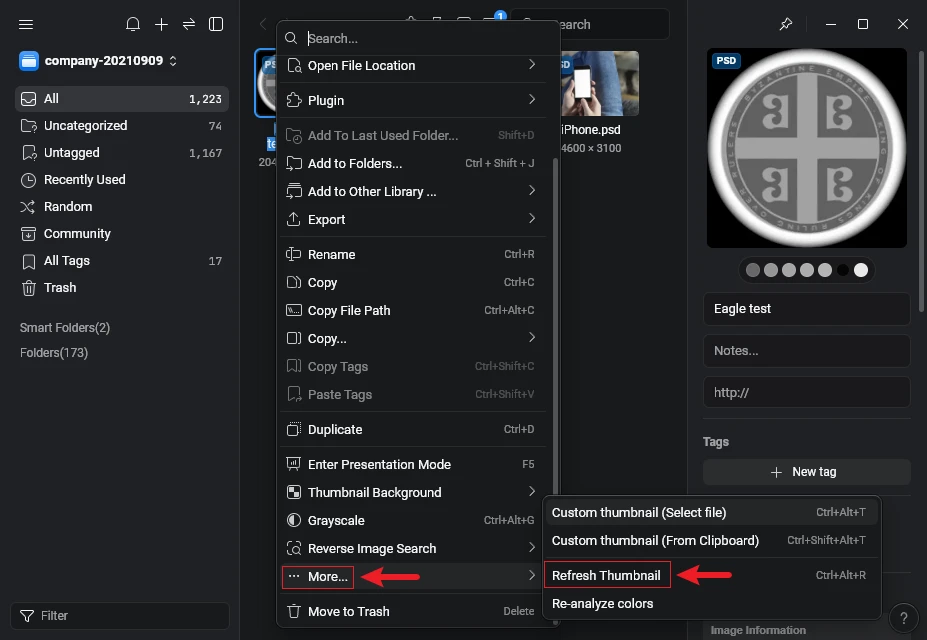
- After updating, right-click on any abnormal PSD file
- Select "More" > "Refresh Thumbnail" to correctly display the thumbnail
Important Notes
- The current version's file preview functionality may differ from previous versions due to macOS system changes
- The clarity of double-click previews may be reduced as we've implemented alternative solutions
- This macOS Sequoia update affects many software applications, including Affinity products (Photo and Designer)
- If certain file formats cannot be previewed using the space bar in Finder, Eagle's preview functionality may also be temporarily impacted
- We will continue to monitor macOS system updates and improve our product accordingly
Additional Resources
- For details about macOS 15.0 updates, refer to the macOS 15.0 Release Notes
- For discussions about preview function issues in the new system, see this Affinity Forum Discussion
We appreciate your understanding and patience as we work to provide the best possible experience with Eagle on macOS Sequoia.